● FCSS - SD-WAN 7.4 Architect Exam Materials
Please note that the exam "FCSS – SD-WAN 7.4 Architect" is no longer offered by Fortinet and is not available for booking through Pearson VUE.
It has been replaced by the exam "NSE 6 – SD-WAN 7.6 Enterprise Administrator."
The new exam version is available on Brave-Dumps and can be purchased.
❌ Please do not order: FCSS – SD-WAN 7.4 Architect
✅ Please order: NSE 6 – SD-WAN 7.6 Enterprise Administrator
It has been replaced by the exam "NSE 6 – SD-WAN 7.6 Enterprise Administrator."
The new exam version is available on Brave-Dumps and can be purchased.
❌ Please do not order: FCSS – SD-WAN 7.4 Architect
✅ Please order: NSE 6 – SD-WAN 7.6 Enterprise Administrator
Question #1
Question #2
You have a FortiGate configuration with three user-defined SD-WAN zones and two members in each of these zones. One SD-WAN member is no longer in use in health-check and SD-WAN rules. You want to delete it.
What happens if you delete the SD-WAN member from the FortiGate GUI?
(Choose one answer)
- A. FortiGate accepts the deletion and removes routes as required.
- B. FortiGate displays an error message. SD-WAN zones must contain at least two members.
- C. FortiGate accepts the deletion and places the member in the default SD-WAN zone.
- D. FortiGate displays an error message. You must use the CLI to delete an SD-WAN member.
Question #3
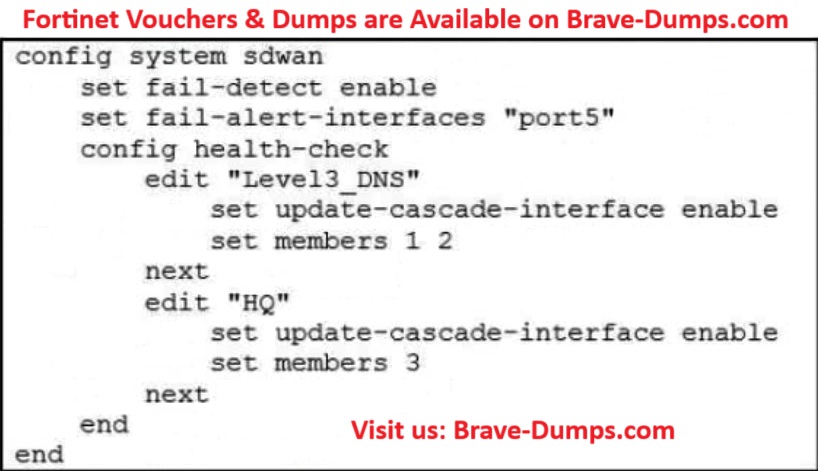
Refer to the exhibit:
Which action will FortiGate take if it detects SD-WAN members as dead?
(Choose one answer)
- A. FortiGate brings down port5 after it detects all SD-WAN members as dead.
- B. FortiGate sends alert messages through port5 when it detects all SD-WAN members as dead.
- C. FortiGate bounces port5 after it detects all SD-WAN members as dead.
- D. FortiGate fails over to the secondary device after it detects port5 as dead.
Question #4
You manage an SD-WAN topology. You will soon deploy 50 new branches.
Which three tasks can you do in advance to simplify this deployment?
Note from Brave-Dumps: If on the real exam asks you to select only two answers, you should choose A and C
(Choose three answers)
- A. Create a ZTP template.
- B. Create model devices.
- C. Define metadata variables value for each device.
- D. Create policy blueprint.
- E. Update the DHCP server configuration.
Question #5
An administrator is configuring SD-WAN to load balance their network traffic.
Which two things should they consider when setting up SD-WAN?
(Choose two answers)
- A. When applicable, FortiGate load balances the traffic through all members that meet the SLA target.
- B. You can select the outbandwidth hash mode with all strategies that allow load balancing.
- C. SD-WAN load balancing is possible only using the best quality and lowest cost (SLA) strategies.
- D. Only the manual and best-quality strategies allow SD-WAN load balancing.
Question #6
Which two statements correctly describe what happens when traffic matches the implicit SD-WAN rule? (Choose two answers)
- A. Traffic is load balanced using the algorithm set for the v4-ecmp-mode setting.
- B. Traffic does not match any of the entries in the policy route table.
- C. The session information output displays no SD-WAN service id.
- D. FortiGate flags the session with may_dirty and vwl_default.
- E. The traffic is distributed, regardless of weight, through all available static routes.
Question #7
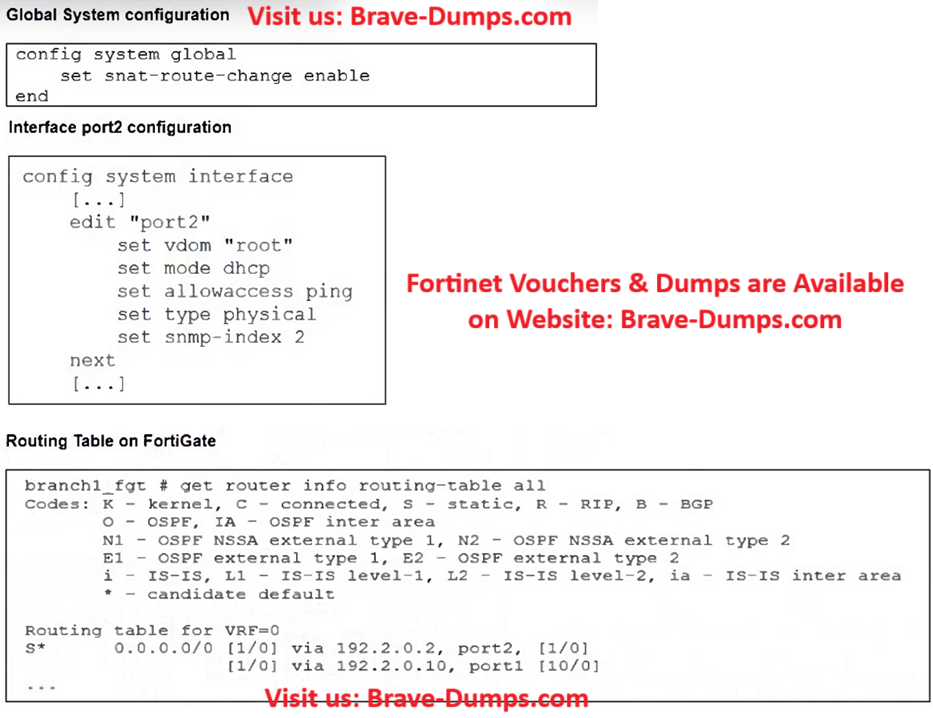
Refer to the exhibit,
Upon configuration changes and the receipt of new packets, which two actions does FortiGate perform on existing sessions established over port2?
(Choose two answers)
- A. FortiGate routes only new sessions over port2.
- B. FortiGate flags the SNAT session as dirty only if the administrator has assigned an IP pool to the firewall policies with NAT.
- C. FortiGate continues routing all existing sessions over port2.
- D. FortiGate updates the gateway information of the sessions with SNAT so that they use port1 instead of port2.
- E. FortiGate flags the sessions as dirty.
Question #8
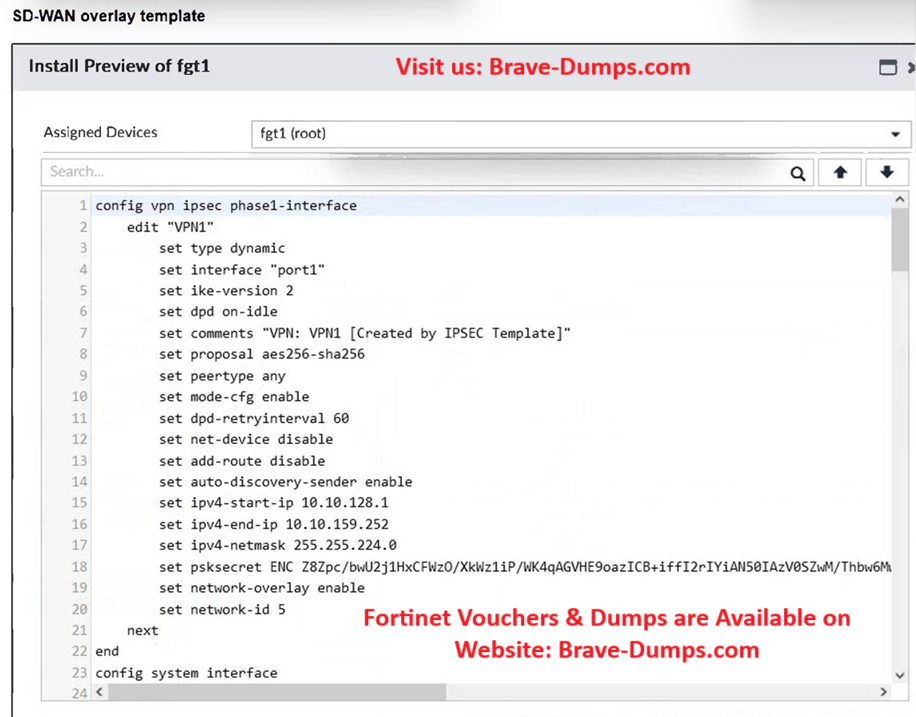
Refer to the exhibit:
The administrator used the SD-WAN overlay template to prepare an IPsec tunnels configuration for a hub-and-spoke SD-WAN topology.
Based on the exhibit, which statement best describes the configuration applied to the FortiGate device?
(Choose one answer)
- A. It is a spoke device that establishes dynamic IPsec tunnels to the hub. It can send ADVPN shortcut requests.
- B. It is a spoke device that establishes dynamic IPsec tunnels to the hub. The local subnet range is 10.10.128.0/23.
- C. It is a hub device. It will automatically discover the spoke devices and add them to the SD-WAN topology.
- D. It is a hub device. It can send ADVPN shortcut offers.
Question #9

For your ZTP deployment, you review the CSV file shown in exhibit and note that it is missing important information.
Which two elements must you change before you can import it into FortiManager?
(Choose two answers)
- A. You must define a value for each device and each user-defined metadata variable.
- B. You must associate a device blueprint with each device.
- C. You must define a name for each device.
- D. You must define a value for each device and each metadata variable that defines an IP address.
Question #10
What are two mandatory post-run tasks that must be performed after using the SD-WAN overlay template? (Choose two answers)
- A. Configure SD-WAN rules
- B. Assign a hub_id metadata variable to each hub device
- C. Create policy packages and assign them to the branch devices
- D. Assign an sdwan_id metadata variable to each device (branch and hub)
- E. Configure routing through the overlay tunnels created by the SD-WAN overlay template
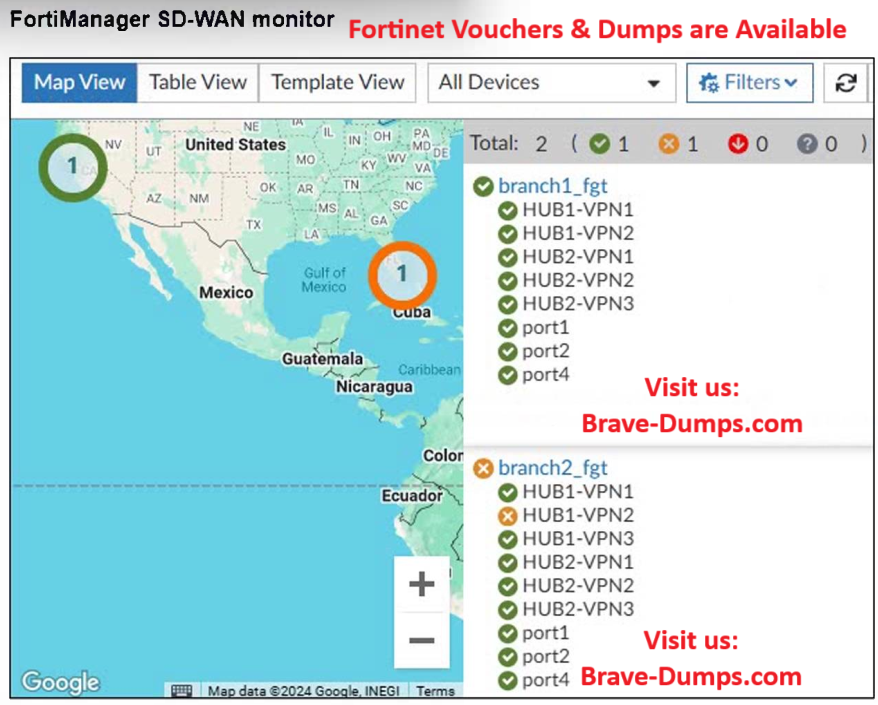
Refer to the exhibit:
An administrator checks the status of an SD-WAN topology using the FortiManager SD-WAN monitor menus. All members are configured with one or two SLAs.
Which two conclusions can you draw from the output shown? (Choose two answers)