View all questions & answers for the FCP - FortiClient EMS 7.2 Administrator Exam Materials exam
FCP - FortiClient EMS 7.2 Administrator Exam Materials-Question 5 Discussion
Comments
Selected Answers: B
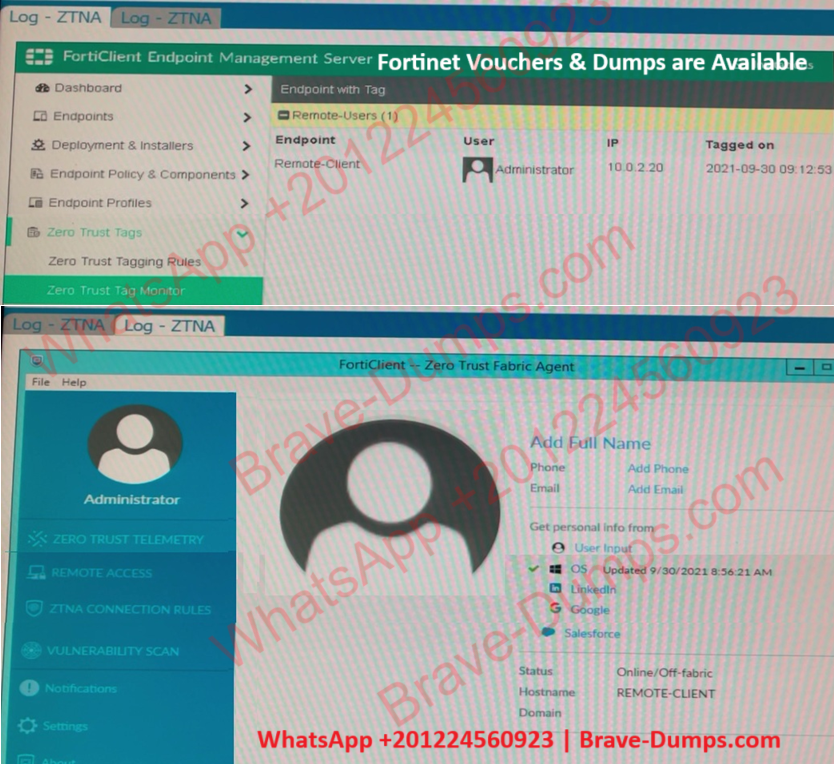
The "Remote-Client" is tagged as "Remote-Users" in the FortiClient EMS Zero Trust Tag Monitor.
To ensure that the tag "Remote-Users" is visible in the FortiClient GUI, the system settings within FortiClient need to be updated to enable tag visibility.
The tag visibility feature is controlled by FortiClient system settings, which manage how tags are displayed in the GUI.
Therefore, the administrator needs to change the FortiClient system settings to enable tag visibility.
Refer to the exhibits. Which show the Zero Trust Tag Monitor and the FortiClient GUI status. Remote-Client is tagged as Remote-Users on the FortiClient EMS Zero Trust Tag Monitor. What must an administrator do to show the tag on the FortiClient GUI? (Choose one answer)
Brave-Dump Clients Votes