View all questions & answers for the FCP - FortiGate 7.4 Administrator Exam Materials exam
FCP - FortiGate 7.4 Administrator Exam Materials-Question 73 Discussion
Comments
Selected Answers: B, C
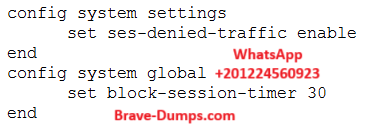
The set ses-denied-traffic enable command ensures that FortiGate creates sessions even for denied traffic. This helps track and log blocked connections.
✔ B. Denied users are blocked for 30 minutes
The set block-session-timer 30 command keeps blocked sessions active for 30 seconds (not minutes). If the question intended to refer to seconds rather than minutes, then B could be correct.
Selected Answers: C, D
C & D is confirmed as per Fortigate 7.4 Study guide page 49
C is Correct: "This creates the denied session in the session table and, if the session is denied, all packets of that session are also denied."
D is Correct: "To reduce the number of log messages generated and improve performance, you can enable a session table entry of dropped traffic." & "...which reduces CPU usage and log generation."
B is not Correct: From the guide "This determines how long a session will be kept in the session table by setting block-session-timer in the CLI. By default, it is set to 30 seconds." This means that the block-session-timer setting does not define how long a user is blocked, but rather how long a denied traffic session remains in the session table.
An administrator has configured the following settings: What are the two results of this configuration? (Choose two answers)
Brave-Dump Clients Votes