View all questions & answers for the NSE 5 - FortiSwitch 7.6 Administrator Exam Materials exam
NSE 5 - FortiSwitch 7.6 Administrator Exam Materials-Question 61 Discussion
Comments
Selected Answers: C
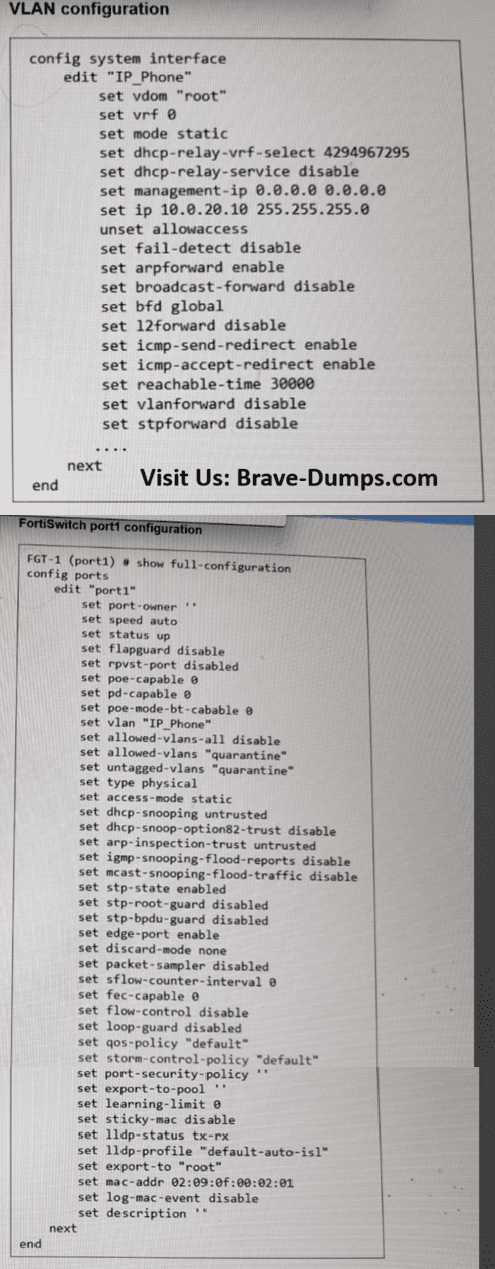
The scenario states that the IP phone is tagging its traffic with VLAN ID 20. On a FortiSwitch, the Native VLAN setting (which is currently set to 20) only applies to untagged incoming traffic; it assigns that VLAN ID to any packet that arrives without a tag.
However, because the IP phone is sending tagged traffic (VLAN 20), the switch performs the following checks:
1. Ingress Processing: For a tagged frame, the tag value (VLAN 20) must match a VLAN in the allowed-vlans list or the native VLAN. While the native VLAN is implicitly allowed for untagged traffic, when traffic arrives already tagged, the switch typically requires that VLAN to be explicitly part of the "Allowed VLANs" list to accept and process the frame.
2. Egress Processing: For traffic returning to the phone, the switch will only send frames out of port1 if the VLAN ID is on the allowed_vlans list.
By adding VLAN 20 to the allowed-vlans list on port1, you ensure that the switch permits both the tagged ingress frames from the phone and the returning egress frames.
Allowed VLANs: This defines the list of VLANs that are allowed on the port for both ingress and egress traffic, and for both tagged and untagged traffic. The native VLAN is implicitly allowed on the port, and therefore, you don't need to include it in the allowed VLANs list. For the port to accept incoming frames tagged with VLANs other than the native VLAN, the frames must be tagged with one of the VLANs defined in the allowed VLANs list. When there are no VLANs defined as untagged VLANs, the egress traffic for an allowed VLAN is tagged. The Allowed VLANs setting is important on ISLs, and in the FortiLink trunk, because the traffic forwarded between the switches and between a switch and FortiGate, is usually tagged with multiple VLANs. You may also need to adjust the Allowed VLANs setting on ports connecting endpoints that send and expect to receive tagged traffic. This is the case for some IP phones or servers that leverage the use of VLAN tagging for their applications.
PAGE: 117 | FORTISWITCH 7.6 ADMIN GUIDE
Refer to the exhibits. An IP phone is connected to port1 of FortiSwitch Access-1. The IP phone tags its traffic with VLAN ID 20. On FortiGate, VLAN IP_Phone (VLAN ID 20) has been configured, and port1 of Access-1 is set with VLAN 20 as the native VLAN. However, the IP phone cannot reach the network. The exhibit shows the partial VLAN configuration and the port1 configuration on Access-1. Which configuration change must you make on FortiSwitch to allow ingress and egress traffic for the IP phone? (Choose one answer)
Brave-Dump Clients Votes