View all questions & answers for the NSE 5 - FortiSwitch 7.6 Administrator Exam Materials exam
NSE 5 - FortiSwitch 7.6 Administrator Exam Materials-Question 53 Discussion
Comments
Selected Answers: B, D
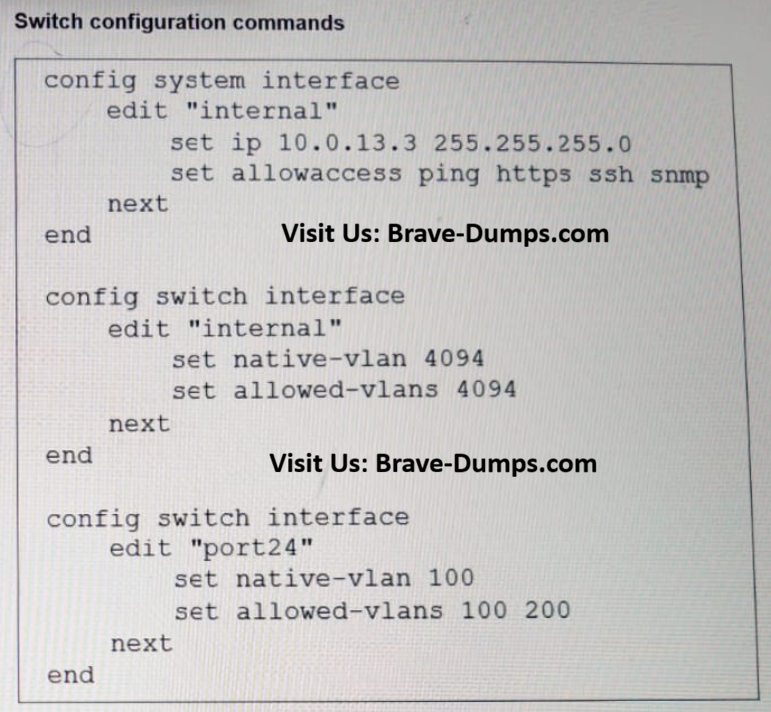
The internal switch interface is on VLAN 4094 (native + allowed), but port24 is set to native VLAN 100 and only allows VLANs 100 and 200 — so VLAN 4094 (management) never traverses the uplink. Changing port24’s native to 4094 or adding VLAN 4094 to port24’s allowed VLANs will fix it.
C is irrelevant and A is an alternate approach (move management into VLAN100) but not the simplest/correct fixes shown.
PAGE: 320 | FORTISWITCH 7.6 ADMIN GUIDE
Refer to the exhibit. Port24 is the only uplink port connected to the network where you need access to FortiSwitch management services. However, FortiSwitch is not accessible on its management interface with IP address 10.0.13.3. Based on the configuration shown in the exhibit, which two actions should you take to fix the issue and access FortiSwitch? (Choose two answers)
Brave-Dump Clients Votes