View all questions & answers for the NSE 5 - FortiSwitch 7.6 Administrator Exam Materials exam
NSE 5 - FortiSwitch 7.6 Administrator Exam Materials-Question 44 Discussion
Comments
Selected Answers: C
IGMP snooping enables FortiSwitch to forward multicast traffic only to ports that connect to active multicast receivers. When a device is interested in receiving multicast traffic, it sends an IGMP report join message that indicates the multicast group it wants to join. FortiSwitch passively listens to IGMP report join messages received at ports to discover multicast receivers. FortiSwitch then uses this information to populate its multicast layer 2 forwarding table with the multicast groups discovered on each port. The result is that when FortiSwitch receives traffic from a sender that is destined to a particular multicast group, FortiSwitch forwards the traffic only to matching ports, thus reducing unnecessary multicast traffic in the network. Moreover, when a device wants to stop receiving multicast traffic, it sends an IGMP report leave message. FortiSwitch then removes the corresponding entry from the multicast layer 2 forwarding table.
FortiSwitch supports IGMP versions 1 and 2 fully, and version 3 partially. For version 3, FortiSwitch doesn't support source filtering, which is a feature that enables you to define specific source addresses that a receiver wants to receive multicast traffic from. When FortiSwitch processes IGMPv3 messages, it creates multicast groups and forwards traffic based on the same way it does for IGMPv2.
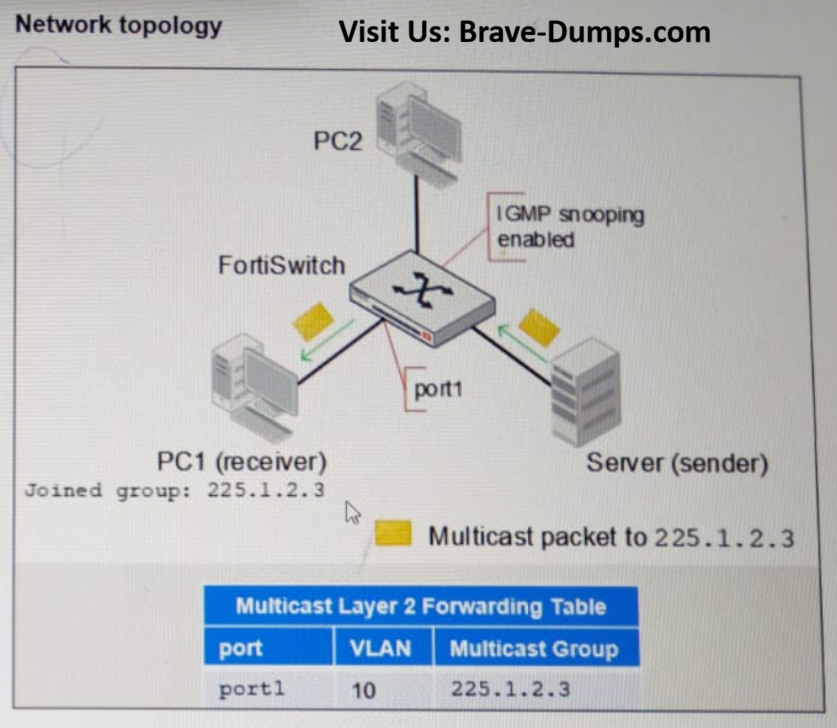
The topology on this slide shows three endpoints connected to FortiSwitch. All endpoints are placed in the same VLAN: VLAN 10. PC1, which is connected to port1 on FortiSwitch, has joined the multicast group 225.1.2.3. Because FortiSwitch has IGMP snooping enabled, FortiSwitch forwards the multicast traffic destined to 225.1.2.3, and sent by the server, to port1 only. If IGMP snooping were disabled, then PC2 would have also received a copy of the multicast traffic. (PAGE 253 FOR REFERENCE)
PAGE: 253 | FORTISWITCH 7.6 ADMIN GUIDE
Refer to the exhibit. PC1 connected to port1 has joined multicast group 225.1.2.3 on VLAN 10 with IGMP snooping enabled. What will happen if you disable IGMP snooping on FortiSwitch? (Choose one answer)
Brave-Dump Clients Votes