View all questions & answers for the NSE 5 - FortiSwitch 7.6 Administrator Exam Materials exam
NSE 5 - FortiSwitch 7.6 Administrator Exam Materials-Question 41 Discussion
Comments
Selected Answers: B
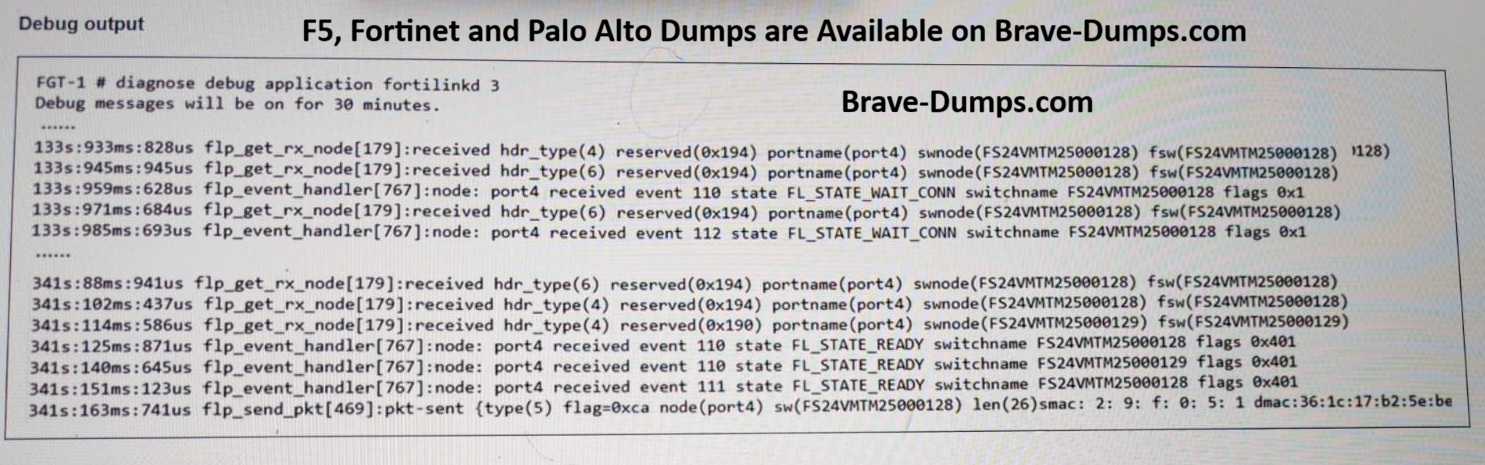
Based on the debug output provided, which shows FortiLink connectivity events and states (like FL_STATE_WAIT_COM and FL_STATE_READY), the best way to verify that FortiLink connectivity is healthy after authorizing a new FortiSwitch is to check for ongoing heartbeat messages between the switch and the FortiGate.
When you specify a switch, the execute switch-controller diagnose-connection command output includes the following connectivity checks between FortiGate and the switch:
1. The FortiLink and CAPWAP connection status, including the last keepalive (or heartbeat) received .
2. The results of pings FortiGate sends to the switch .
3. The detected hops resulting from a traceroute FortiGate performs
After you authorize a switch and it comes online, the switch starts sending FortiLink heartbeats to FortiGate every 3 seconds. FortiGate then acknowledges the heartbeats by sending a reply to the switch. The debug output for the fortilinkd process will also show these heartbeats.
PAGE: 82, 396, and 399 | FORTISWITCH 7.6 ADMIN GUIDE
Refer to the exhibit. You have just authorized a new FortiSwitch on your FortiGate, and it appears online in the GUI. To verify that FortiLink connectivity is healthy, what should you check next? (Choose one answer)
Brave-Dump Clients Votes