View all questions & answers for the NSE 4 - FortiOS 7.6 Administrator Exam Materials exam
Comments
Selected Answers: A, C
Selected Answers: C, D
Selected Answers: A, D
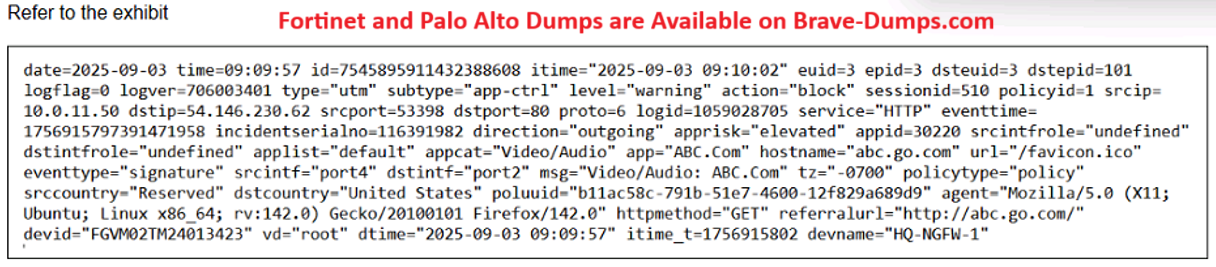
"You can also view the details on the Forward Traffic logs page, where firewall policies record activity. You can also find a summary of the traffic to which FortiGate applied application control. Again, this is because
application control is applied by a firewall policy. To find out which policy applied application control, you can review either the Policy ID or the Policy UUID fields of the log message."
C is incorrect and used to generate generic logs on the firewall as a test. Google the CLI command and see that its wrong
Selected Answers: A, D
Selected Answers: C, D
I think see C is correct
Selected Answers: A, D
AD or AC please
Selected Answers: A, D
these questions are same I think please verify
Selected Answers: A, D
Which two ways can you view the log messages shown in the exhibit? (Choose two answers)
Brave-Dump Clients Votes