View all questions & answers for the NSE 5 - FortiManager 7.6 Administrator Exam Materials exam
NSE 5 - FortiManager 7.6 Administrator Exam Materials-Question 26 Discussion
Comments
Selected Answers: A
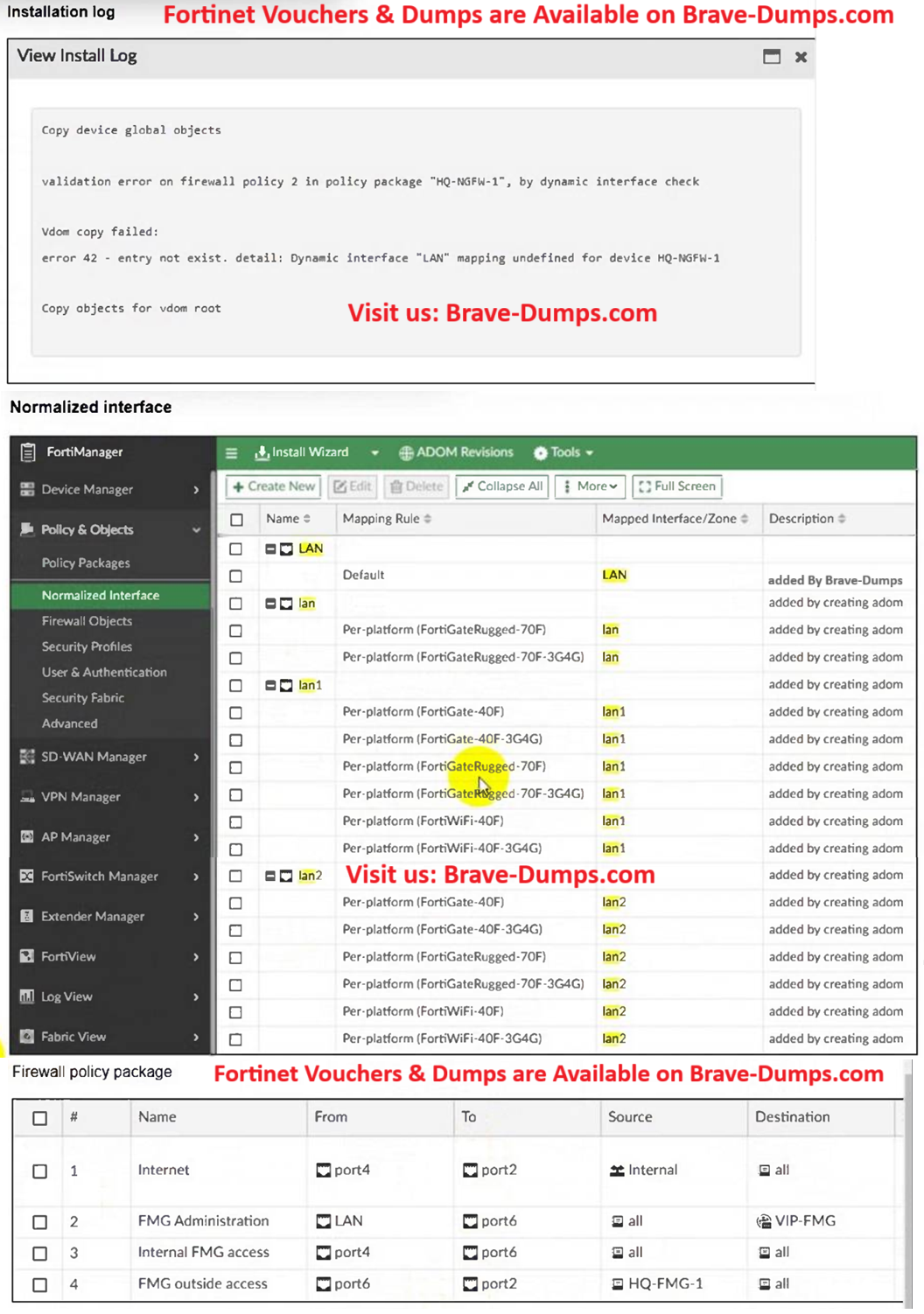
Map logical interface names used in a policy package to physical interface names on a specific FortiGate device.
Keep using a shared policy package across different models without editing the base policy.
In this case, you can map:
LAN → lan1
Selected Answers: D
FortiGate models have specific interface names (e.g., port1, wan1, lan1), and these names vary by platform.
The FortiGateRugged-70F uses lan1 instead of a generic "LAN" interface name.
To resolve the error, you must update the policy to reference the correct interface name supported by the device.
Selected Answers: A
D could be an alternative but better choice in this case is A.
Refer to the exhibits. An administrator must replace the source LAN interface in policy ID 2 on their FortiGateRugged-70F. However, when they try to install the policy package, they receive the error shown in the exhibit. What should the administrator do to resolve the error? (Choose one answer)
Brave-Dump Clients Votes