View all questions & answers for the FCSS - FortiSASE 25 Administrator Exam Materials exam
FCSS - FortiSASE 25 Administrator Exam Materials-Question 35 Discussion
Comments
Selected Answers: B
Selected Answers: B
Fortinet documentation makes clear that overlay IDs must be identical on hub and spoke for ADVPN to establish correctly:
''When configuring the root and downstream FortiGates the Fabric Overlay Orchestrator configures... IPsec overlay configuration (hub and spoke ADVPN tunnels).''
''The Fabric root will be the hub and any first-level downstream devices from the Fabric root will be spokes.''
In the scenario:
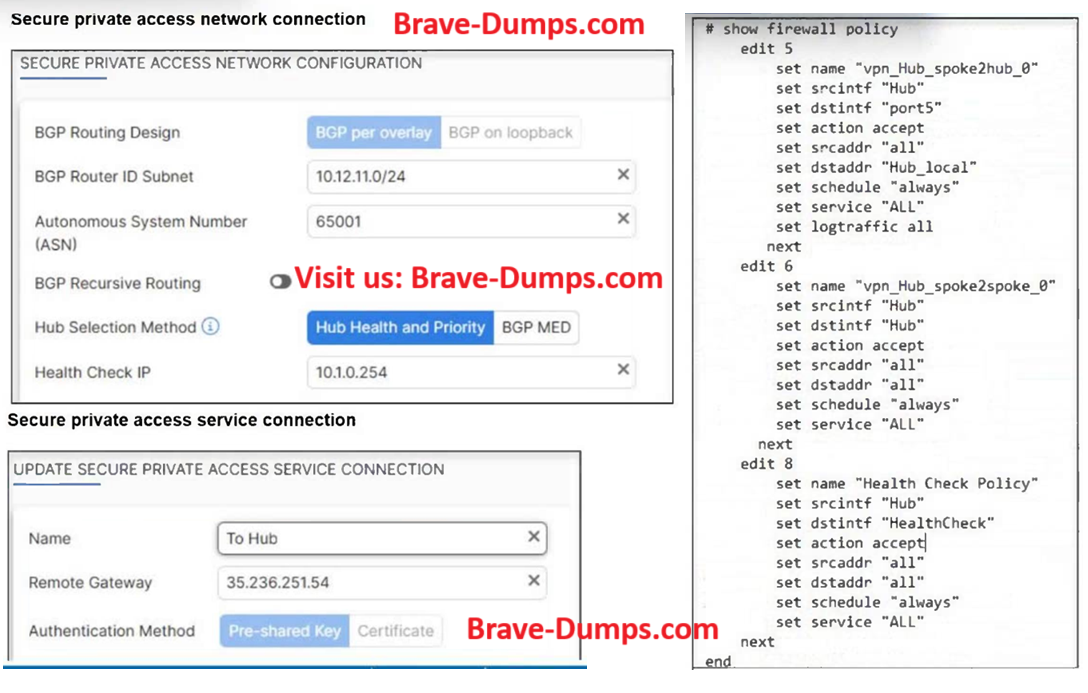
FortiSASE overlay ID = 100
FortiGate hub overlay ID = 101
Mismatch prevents tunnel establishment. Therefore, the fix is: B. The network overlay ID must match on FortiSASE and the hub.
-
Taz
2025-10-31 13:49:02
Can someone please confirm???
Selected Answers: B
FortiSASE spokes support only IKEv2 for IPsec tunnels to the hub. IKEv2 supports the network ID feature,
which enables the administrator to establish multiple tunnels between the same local and remote gateways,
which can be required during failover scenarios involving SD-WAN and ADVPN.
Secure Private Access FortiSASE
P162
FortiSASE supports the following routing design methods:
• BGP per overlay: This is the default routing design method on FortiSASE. Each spoke establishes a
separate IBGP session toward each hub. Each IBGP session terminates on the tunnel with the
corresponding IP address. You must enable mode-cfg on the FortiGate hub to assign an IP address to the
FortiSASE spoke tunnel interface.
• BGP on loopback: This method simplifies the configuration on the hub side and reduces the number of
routes advertised on the network. Each spoke establishes a single IBGP session to each hub. The IBGP
session terminates on the loopback interface, which uniquely defines each SD-WAN node.
You must use the same BGP routing designs for all hubs and spokes. You cannot mix them.
Selected Answers: D
Explanation:
Auto-discovery-sender: This feature allows devices to automatically discover each other for VPN negotiation. However, sometimes it can cause issues with tunnel establishment, especially when there are pre-configured IPsec connections. Disabling it on the FortiSASE spoke device can resolve the tunnel issue.
Why other options are incorrect:
A. FortiSASE spoke devices do not support mode config: Mode config is a configuration option related to IPsec Phase 1 settings. It does not directly affect the establishment of the VPN tunnel. FortiSASE devices support mode config.
B. The network overlay ID must match on FortiSASE and the hub: While network overlay IDs are important for proper routing within the VPN network, they are not a requirement for establishing the tunnel itself. The mismatch would affect routing after the tunnel is established.
C. The BGP router ID must match on the hub and FortiSASE: BGP router IDs are important for routing. However, they are not directly related to the IPsec tunnel establishment. Mismatched BGP router IDs would impact routing within the network but not the VPN tunnel setup.
Refer to the exhibits. A FortiSASE administrator is trying to configure FortiSASE as a spoke to a FortiGate hub. The VPN tunnel does not establish. Based on the provided configuration, which configuration needs to be modified to bring the tunnel up? (Choose one answer)
Brave-Dump Clients Votes