View all questions & answers for the FCSS - SD-WAN 7.4 Architect Exam Materials exam
FCSS - SD-WAN 7.4 Architect Exam Materials-Question 50 Discussion
Comments
Selected Answers: D
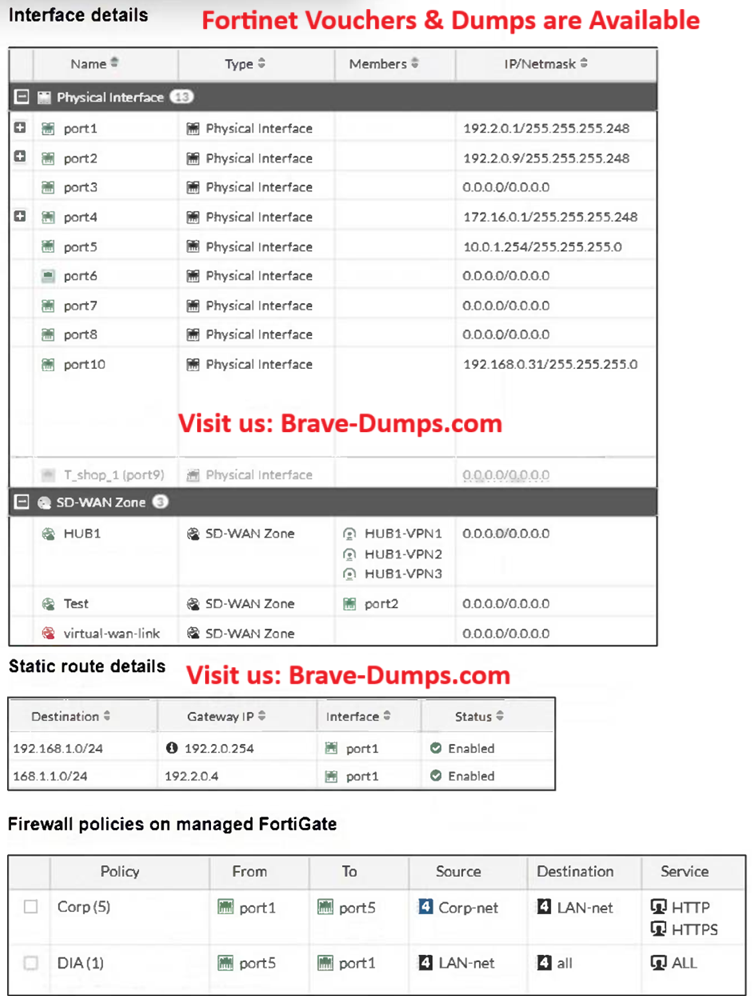
Port2 is already a member of another SD-WAN zone, but it can be moved without deleting the zone, as long as it is not used in any policies, Port2 is used in a static route, but this does not prevent it from being added to an SD-WAN zone.
Only firewall policies prevent an interface from being added to SD-WAN. Static routes do not.
Refer to the exhibits. The interface details, static route configuration, and firewall policies on the managed FortiGate device are shown. You want to configure a new SD-WAN zone, named Underlay, that contains the interfaces port1 and port2. What must be your first action? (Choose one answer)
Brave-Dump Clients Votes