View all questions & answers for the FCSS - SD-WAN 7.4 Architect Exam Materials exam
Comments
Selected Answers: C
Selected Answers: B
The Application setting is always visible on the FortiManager menu. However, if you decide to configure SD-WAN rules directly from the FortiGate GUI, you need to enable GUI visibility for application with the CLI commands "set gui-app-detection-sdwan enable"
Selected Answers: C
From FortiGate v7.2 and above versions we can enable application detection as criteria in SD-WAN rules in GUI and CLI
GUI:
go to System -> Feature Visibility and enable Application Detection Based SD-WAN.
CLI:
config system global
set gui-app-detection-sdwan enable
end
I think as long as the feature is available in the GUI, it should be considered the primary method. The CLI should only be used if it is not accessible through the GUI.
-
Jim Abshire
2025-10-15 16:26:54
I agree with your assessment, however, if what you say is accurate the Study Guide should reflect the same, and it doesn't. It specifically states use CLI from Fortigate device. Any chance you can check with Fortinet directly so we can clear this up? I would like to get all questions correct.
Selected Answers: B
-
Brave-Dumps.com Admin
2025-07-16 20:16:16
The question doesn't mention FortiGate or FortiManager, but the image attached in the question is from a FortiGate device, so it should be C. -
Jim Abshire
2025-10-16 16:36:26
Yes it does, the question starts out with, see below, it says from the Fortigate GUI. "An administrator configures SD-WAN rules for a DIA setup using the FortiGate GUI" -
Jim Abshire
2025-10-16 16:36:31
Yes it does, the question starts out with, see below, it says from the Fortigate GUI. "An administrator configures SD-WAN rules for a DIA setup using the FortiGate GUI"
Selected Answers: C
Selected Answers: C
Note
This functionality is available in FortiOS 7.2.1 and later. Prior to 7.2.1, individual applications can be selected in SD-WAN rules by default.
After upgrading to 7.2.1 or later, the GUI functionality is available if applications are already configured in SD-WAN rules prior to upgrading. Otherwise, by default, individual applications and application groups cannot be selected in SD-WAN rules. To enable this functionality, see step 1 in the following procedure.
Enable the feature visibility:
Go to System > Feature Visibility.
In the Additional Features section, enable Application Detection Based SD-WAN.
Click Apply.
Note
To enable GUI visibility of application detection based SD-WAN in the CLI:
config system global
set gui-app-detection-sdwan enable
end
Selected Answers: C
NOTE: Some people may not find the feature there because they are in the root vdom. You need to be in the Global vdom.
Selected Answers: B
Selected Answers: B
-
Jim Abshire
2025-10-14 16:00:17
BTW, I checked my configuration via CLI and the set gui-app-detection-sdwan is set to enable. I don't recall doing it. -
Jim Abshire
2025-10-14 16:04:00
BTW, I checked my configuration via CLI and the set gui-app-detection-sdwan is set to enable. I don't recall doing it. I changed it to disable and all it did was disable from the GUI, the option is still there and I just clicked to enable it.
Selected Answers: B
FortiGate accepts the deletion and removes routes as required.
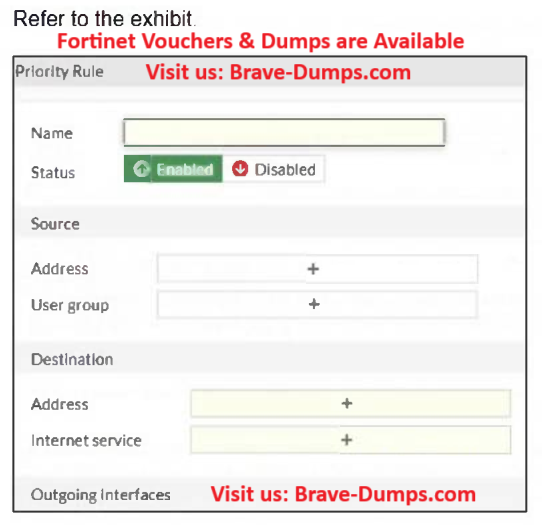
An administrator configures SD-WAN rules for a DIA setup using the FortiGate GUI. The page to configure the source and destination part of the rule looks as shown in the exhibit. The GUI page shows no option to configure an application as the destination of the SD-WAN rule. Why? (Choose one answer)
Brave-Dump Clients Votes