View all questions & answers for the NSE 4 - FortiOS 7.6 Administrator Exam Materials exam
Comments
Selected Answers: C
Selected Answers: D
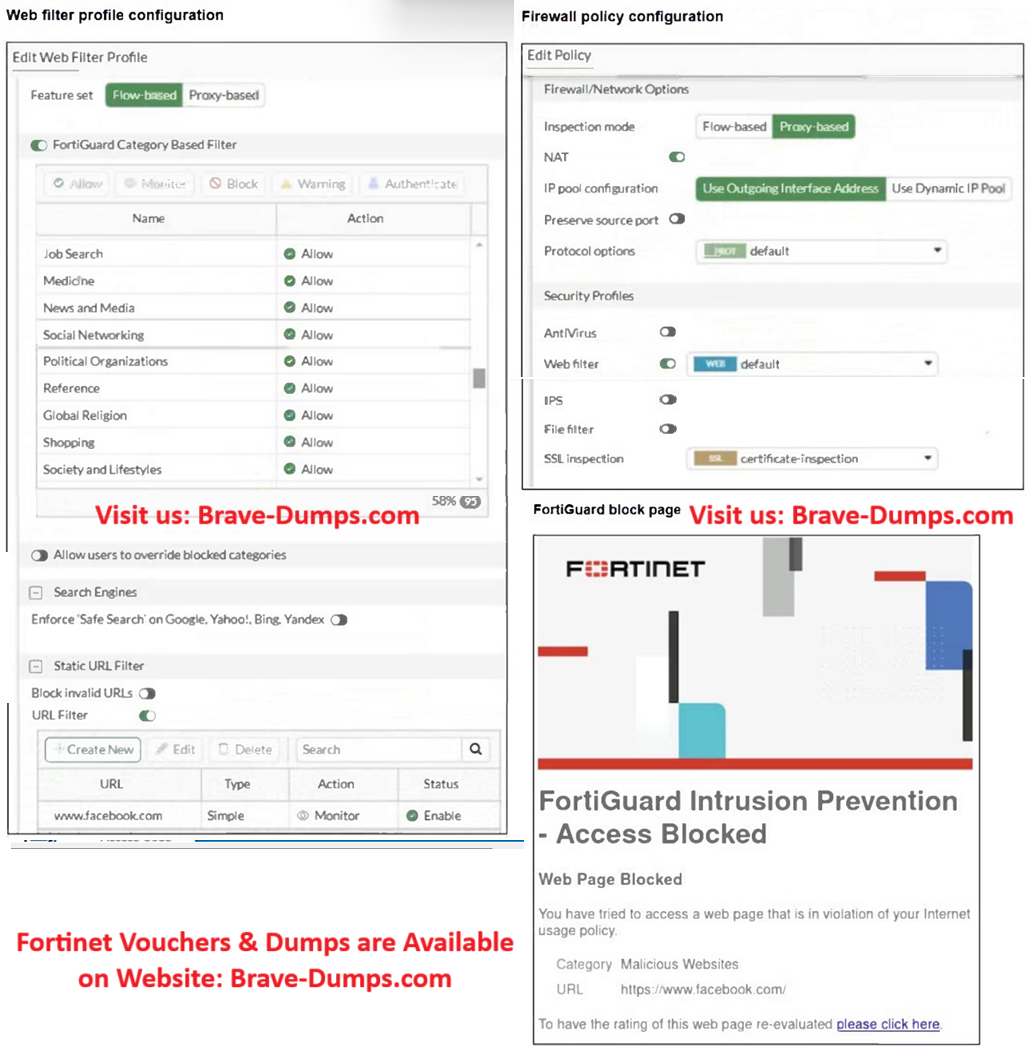
facebook.com appears under the Static URL Filter with Action = Monitor.
FortiGate still blocks it as Malicious Websites.
When the URL filter action is “Monitor,” FortiGate only logs the attempt but still enforces the FortiGuard rating — meaning FortiGuard’s default “Block” action remains active.
If the goal is to allow facebook.com, the URL filter must explicitly Allow it.
Therefore:
B is wrong because no web rating override exists.
D is right because the URL filter action (Monitor) is the incorrect configuration that caused the block.
Selected Answers: B
On the Blocking Page we can see that www.facebook.com is categorized as "Malicious Website".
That means that there is a Web Category Override somewhere in the configuration where facebook.com has been manually categorized as Malicious Website
Selected Answers: C
The firewall policy, however, is set to Proxy‑based inspection.
In FortiOS, the feature set of the security profile must match the inspection mode of the policy; a flow‑based profile attached to a proxy‑based policy can lead to unexpected behavior, including FortiGuard default blocking instead of applying the intended URL filter settings to www.facebook.com.
So correct option is C
Selected Answers: B
C isn't right since a web filter inspection mode doesn't need to match a firewall policy inspection mode
D isn't correct either since although the doing it as Simple / www.facebook.com isn't a great way of doing it, it should still allow browsing directly to www.facebook.com as the question states.
A just doesn't make any sense.
So that leaves B. There must an override which we don't see in the question which is labeling facebook.com as malicious.
Selected Answers: B
Selected Answers: B
Selected Answers: C
Selected Answers: B
Selected Answers: C
Selected Answers: B
Selected Answers: B
-
Brave-Dumps.com Admin
2026-05-17 00:48:48
B
Refer to the exhibits. A web filter profile configuration and firewall policy configuration are shown. You are trying to access www.facebook.com, but you are redirected to a FortiGuard web filtering block page. Based on the exhibits, what is the possible cause of the issue? (Choose one answer)
Brave-Dump Clients Votes