View all questions & answers for the NSE 4 - FortiOS 7.6 Administrator Exam Materials exam
Comments
Selected Answers: B, E
For reference there is same question in the FCP-FGT 7.6 AD sample questions.
Selected Answers: B, E
-
Brave-Dumps.com Admin
2025-07-12 23:59:09
Thanks, Mahboab! for sharing your experience in the Brave-Dumps community. You're absolutely right, and I’ve updated the website to B&E, Appreciate your valuable input!
Selected Answers: D, E
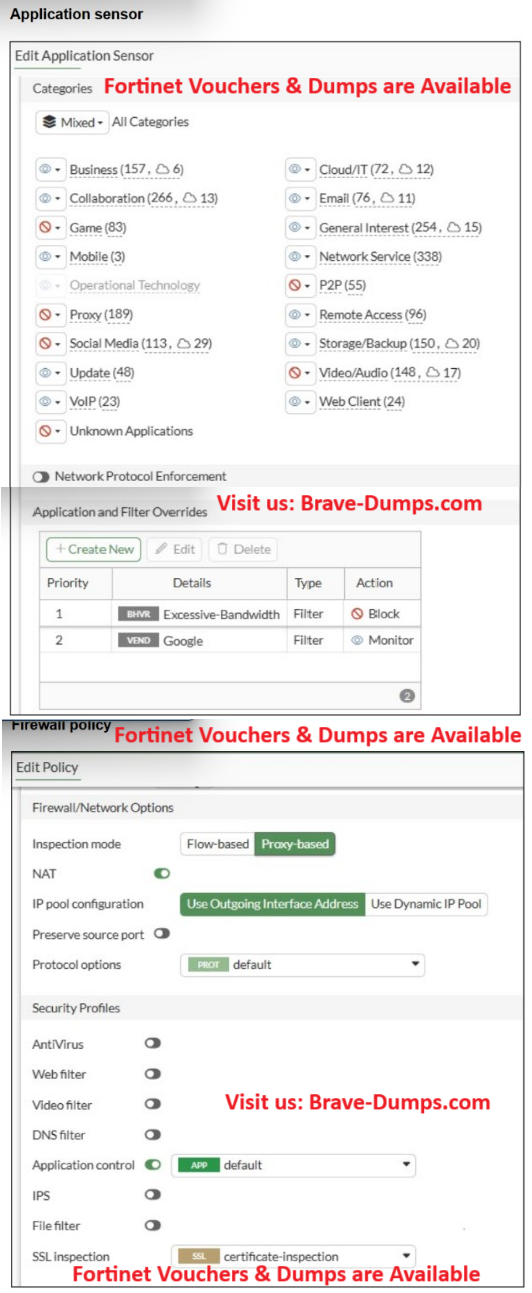
In the Application Control profile you have two overrides:
Priority 1 – Excessive-Bandwidth (behavior filter) → Action: Block
Priority 2 – Google (vendor filter) → Action: Monitor
FortiGate processes Application and Filter Overrides from top to bottom.
The first matching override wins.
So when a Google application uses a lot of bandwidth, it matches the “Excessive-Bandwidth” filter first (priority 1), and the action is Block.
The traffic is dropped before FortiGate even checks the “Google – Monitor” override.
If you apply answer D:
D. Move up Google in the Application and Filter Overrides section to set its priority to 1.
then the order becomes:
Priority 1 – Google (Monitor → allow + log)
Priority 2 – Excessive-Bandwidth (Block)
Now Google traffic hits the Google override first, is allowed, and only non-Google apps are affected by the “Excessive-Bandwidth” block.
So D directly fixes the root cause: the wrong priority of the overrides.
Why B is not the real fix
B. Change the Inspection mode to Flow-based.
Changing the policy from Proxy-based to Flow-based does not change:
the Application Control profile,
the list of overrides, or
the order in which those overrides are evaluated.
The override “Excessive-Bandwidth – Block” would still be on top, so Google traffic that matches this behavior filter would continue to be blocked, even in Flow-based mode.
Flow-based is generally recommended for App Control, but it does not solve the specific problem described in the question. The real problem is the override order, and only D addresses that.
-
abdulrahman
2026-03-21 18:40:35
from chatGPT the order would matter if there is multible overrides or filters. but in this case there is one override (google -> monitor ) and one filter (excessive bandwidth -> block ) and the application profile always check the override first and the the filters.
Selected Answers: D, E
Selected Answers: D, E
Selected Answers: D, E
Selected Answers: D, E
Proxy doesnt have effect in this config.
Selected Answers: B, E
Selected Answers: D, E
Selected Answers: D, E
From the application sensor:
Category Proxy is blocked.
There is an Application Override:
Priority 1: Excessive-Bandwidth → Block
Priority 2: Google → Monitor
Application Control processes overrides by priority order. If Google traffic matches the higher-priority blocked signature/category first, the Google override is never reached. Moving Google above the blocking rule ensures Google is matched first.
Also, the firewall policy uses:
Application Control enabled
SSL Inspection = certificate-inspection
Most Google applications use HTTPS. With only certificate inspection, FortiGate cannot fully identify many application signatures. Deep SSL inspection is required for reliable identification and enforcement of Google applications. The Administration Guide notes that many application control signatures require decrypted HTTPS traffic for full application detection.
Why the other answers are incorrect
❌ A. Add .google.com to the URL category in the security profile
This is an Application Control issue, not a Web Filter categorization issue.
❌ B. Change the Inspection mode to Flow-based
Proxy-based inspection is supported for Application Control and is not the cause of the problem.
❌ C. Change the action for Google to Allow
The Google override is already set to Monitor, which is not blocking traffic. The real problem is that it has lower priority than the blocking rule and Google traffic may not be properly identified without deep inspection.
Selected Answers: D, E
You have implemented the application sensor and the corresponding firewall policy as shown in the exhibits. You cannot access any of the Google applications, but you are able to access www.fortinet.com. Which two actions would you take to resolve the issue? (Choose two answers)
Brave-Dump Clients Votes