View all questions & answers for the FCSS - Network Security 7.4 Support Engineer Exam Materials exam
FCSS - Network Security 7.4 Support Engineer Exam Materials-Question 33 Discussion
Comments
Selected Answers: C
If the IPS caused high CPU usage problems, you can use the diagnose test application
ipsmonitor command with option 5 to isolate where the problem might be. Option 5 enables IPS bypass
mode.
In this mode, the IPS is still running, but it is not inspecting traffic. If the CPU usage decreases after that, it
usually indicates that the volume of traffic being inspected is too high for that particular FortiGate model.
If the CPU usage remains high after you enable IPS bypass mode, it usually indicates a problem in the IPS
engine that you must report to Fortinet Support.
If you enable IPS bypass mode, remember to disable it after you finish troubleshooting, using option 5.
Another recommendation to keep in mind is if you need to restart the IPS, don't use the diagnose sys
kill command. Instead, use option 99, as shown on this slide. This guarantees that all IPS-related
processes will restart correctly.
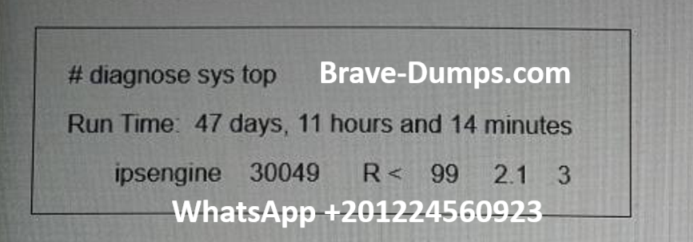
Refer to the exhibit. FortiGate is showing continuous high CPU usage. During a maintenance window the CLI command diagnose sys top displays the output shown in the exhibit. The CLI command diagnose test application ipsmonitor 5 was run but the CPU usage by daemon ipsengine did not drop. What immediate action can you take to reduce the CPU usage effectively? (Choose one answer)
Brave-Dump Clients Votes